One Current Pro Open the app

Your life is one line. Everything else is a thread that can come back.

One Current is a calm, private timeline of your life. Whatever pulls at your attention — an unanswered message, a worry, a decision you keep postponing — becomes a visible thread branching off your main line. You see it, you decide what it needs, the line changes, and you return to your life.

Open One Current

Free to start. Your threads stay on your device. No ads.
One Current on a phone: a main line moving through Now, with colored threads running alongside it and a small wholeness chip in the corner.

What it is

A picture of where your attention actually is

Most of what tires you out is not the work in front of you — it is everything running in the background. The argument you keep replaying. The letter you have not answered. The comparison that flares up every time you open your phone. One Current gives each of those a line of its own, so instead of a vague weight you see exactly what is open, how strongly it pulls, and how long it has been running.

One main line

Your life, moving through Now. Everything on it is where you actually are.

Threads

Anything that split off and keeps pulling — a person, a fear, a task, a season of life. Each has a loudness, and the line shows it: louder threads run thicker and more restless.

Loudness

Threads left undecided grow louder on their own, day by day — just like real worries. Any honest decision quiets them again.

Integration

Threads are not deleted or suppressed. When one has given you what it can, it curves back into your main line and travels with you.

Living themes

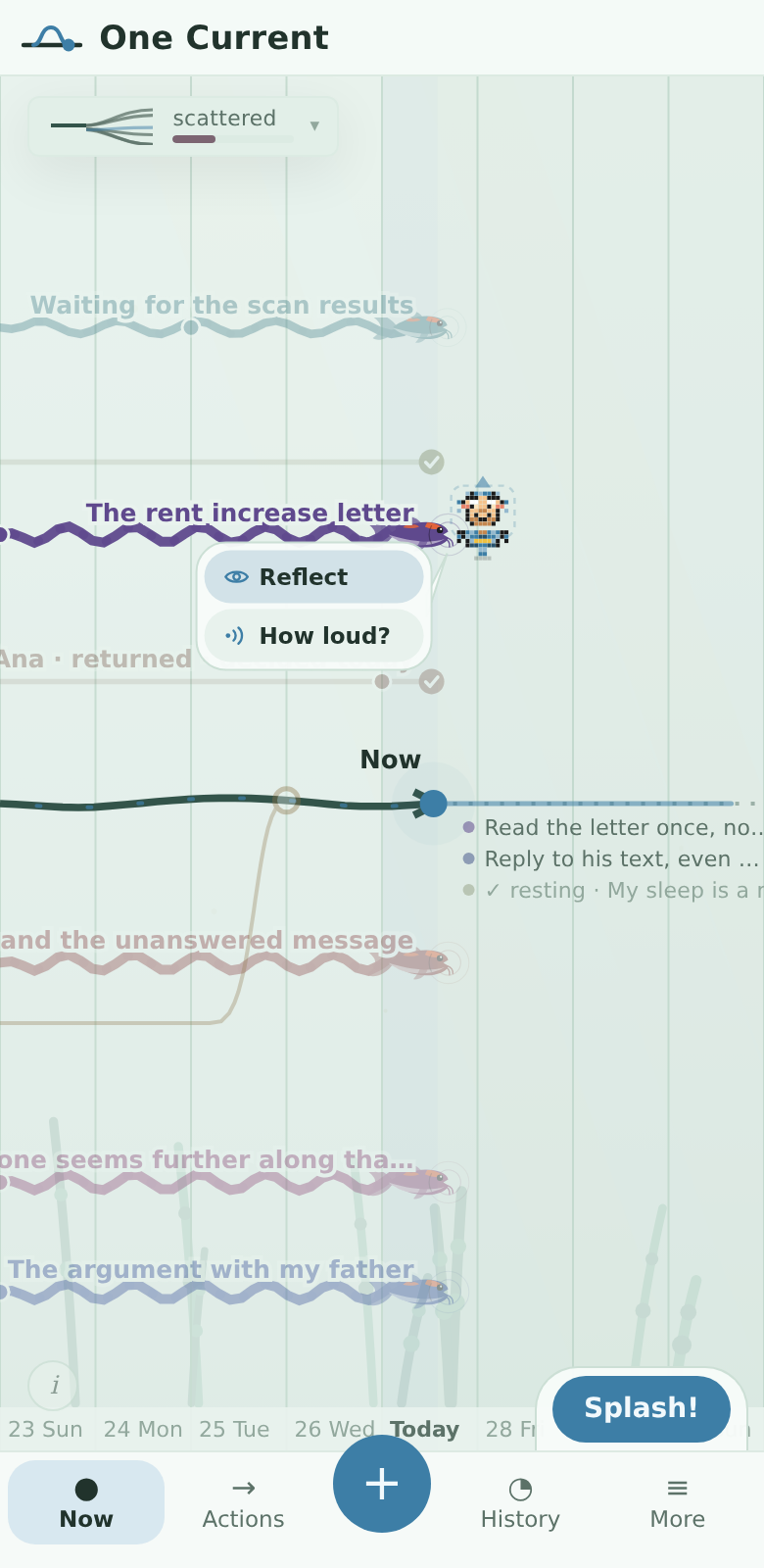
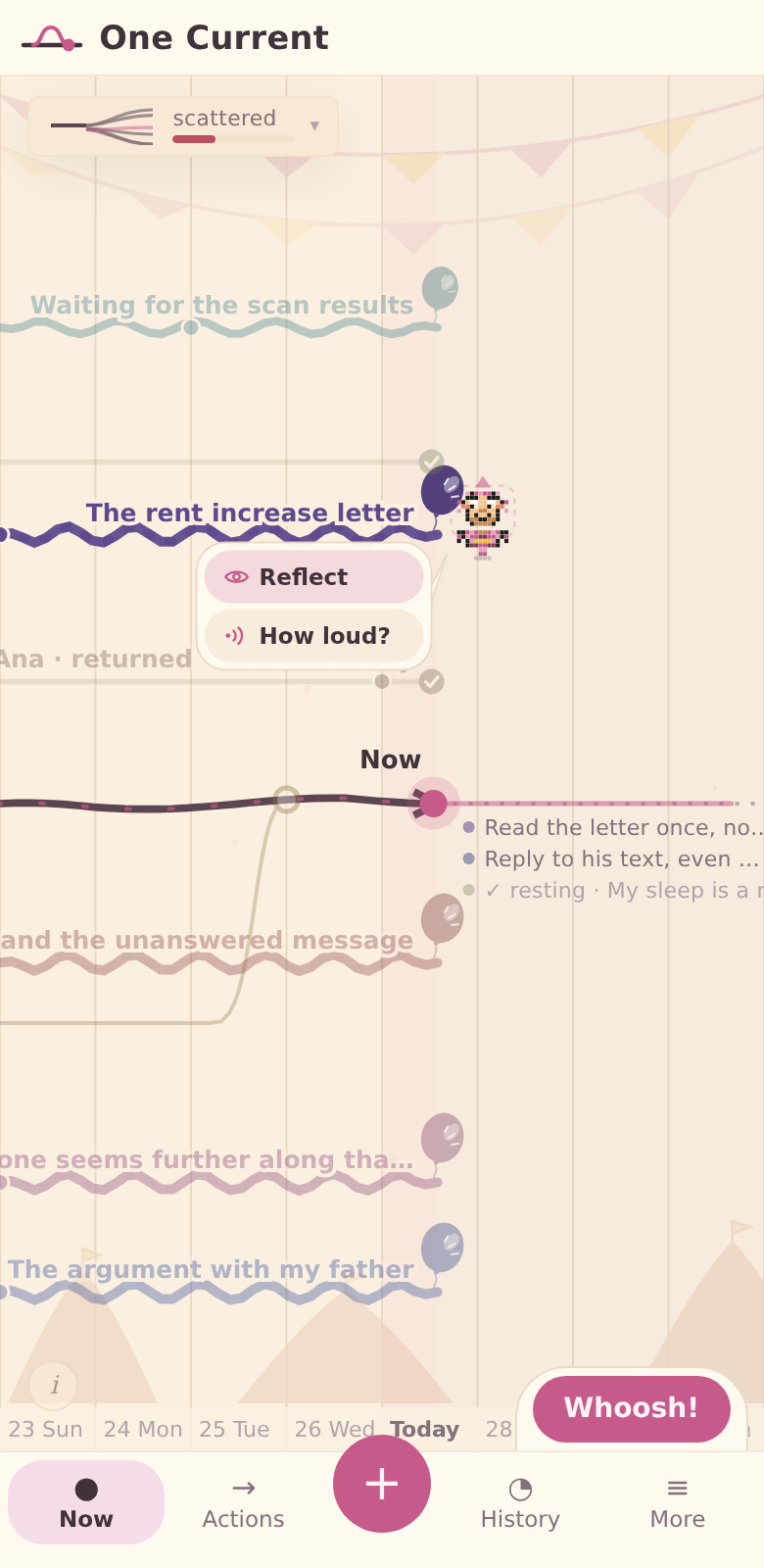
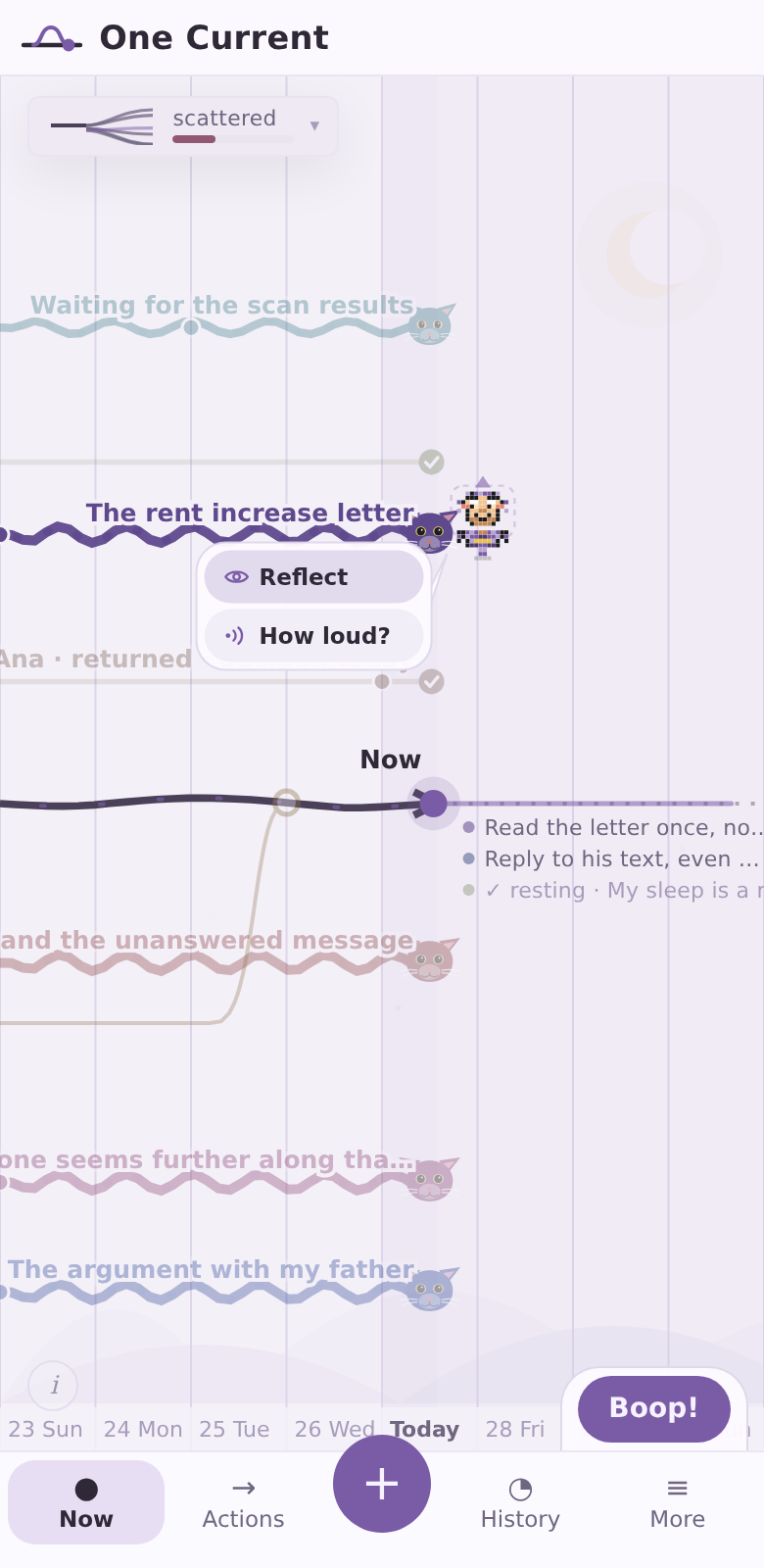
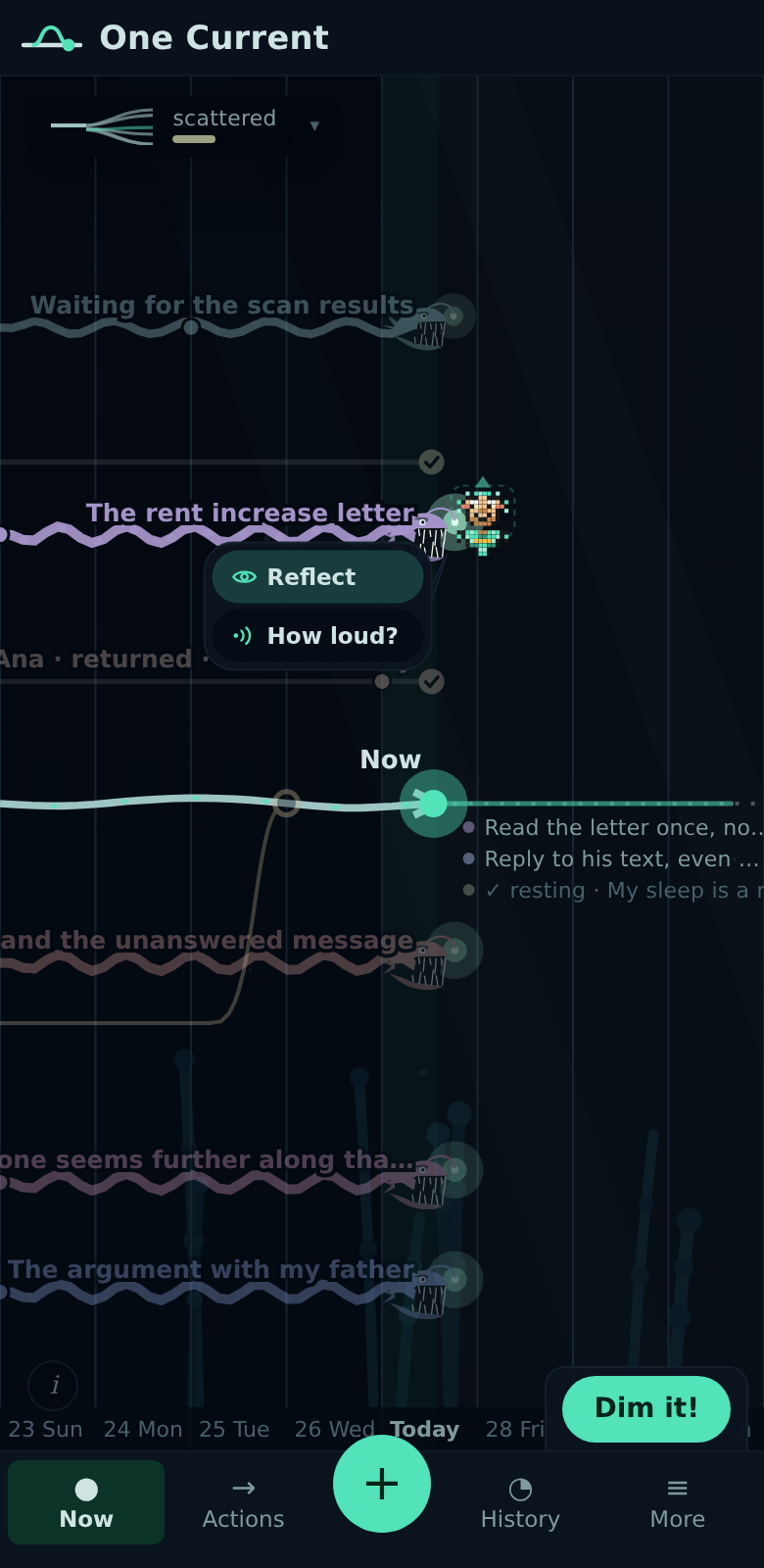
From quiet Riverbed to koi ponds, pomeranian pups, balloons, cats, anglerfish, ghosts, and dragons — each open thread becomes a small creature that settles when you decide.

In your language

The whole app speaks English or Spanish — every word it says changes, while your own words stay exactly as you wrote them.

How it works

The whole loop takes about a minute

One Current is not a place to spend time. It is a place to make one small, honest decision and leave.

1 Name what is pulling at you

Tap + and write it down in your own words. A new thread appears on the timeline immediately — roughly when it started, colored, with the strength of its pull.

That alone changes something: the pull now has a shape and a place, instead of circling in your head.

The full timeline: several named threads running parallel to the main line with day markers and the Now point where the main line continues.

Every open thread stays visible until you decide what it needs.

2 Say how loud it is

Tap a thread and a quick panel opens: its name and one dial — how loud is this thread right now? Set it and go; that touch is not a commitment to do anything.

Or skip the panel entirely: press the thread and slide your thumb up or down, and its loudness dials right there on the timeline.

Loudness is honest over time too. A thread left undecided grows louder day by day, and the line shows it — thicker, more restless — until you give it a decision.

The quick panel for a thread: its name, a loudness control, and a note that undecided days have made it louder.

One control first. Everything else stays folded away.

3 Decide what it needs today

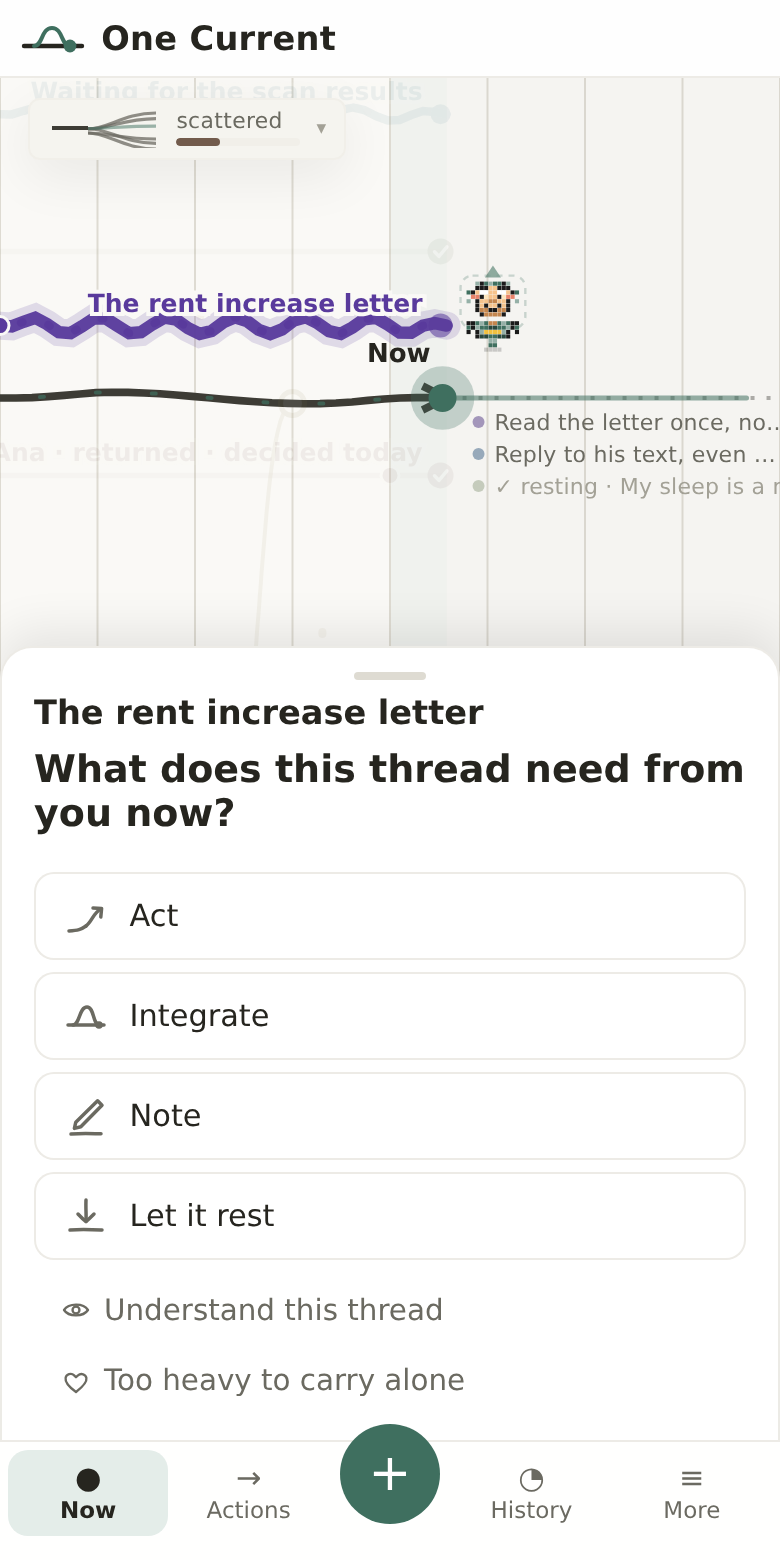
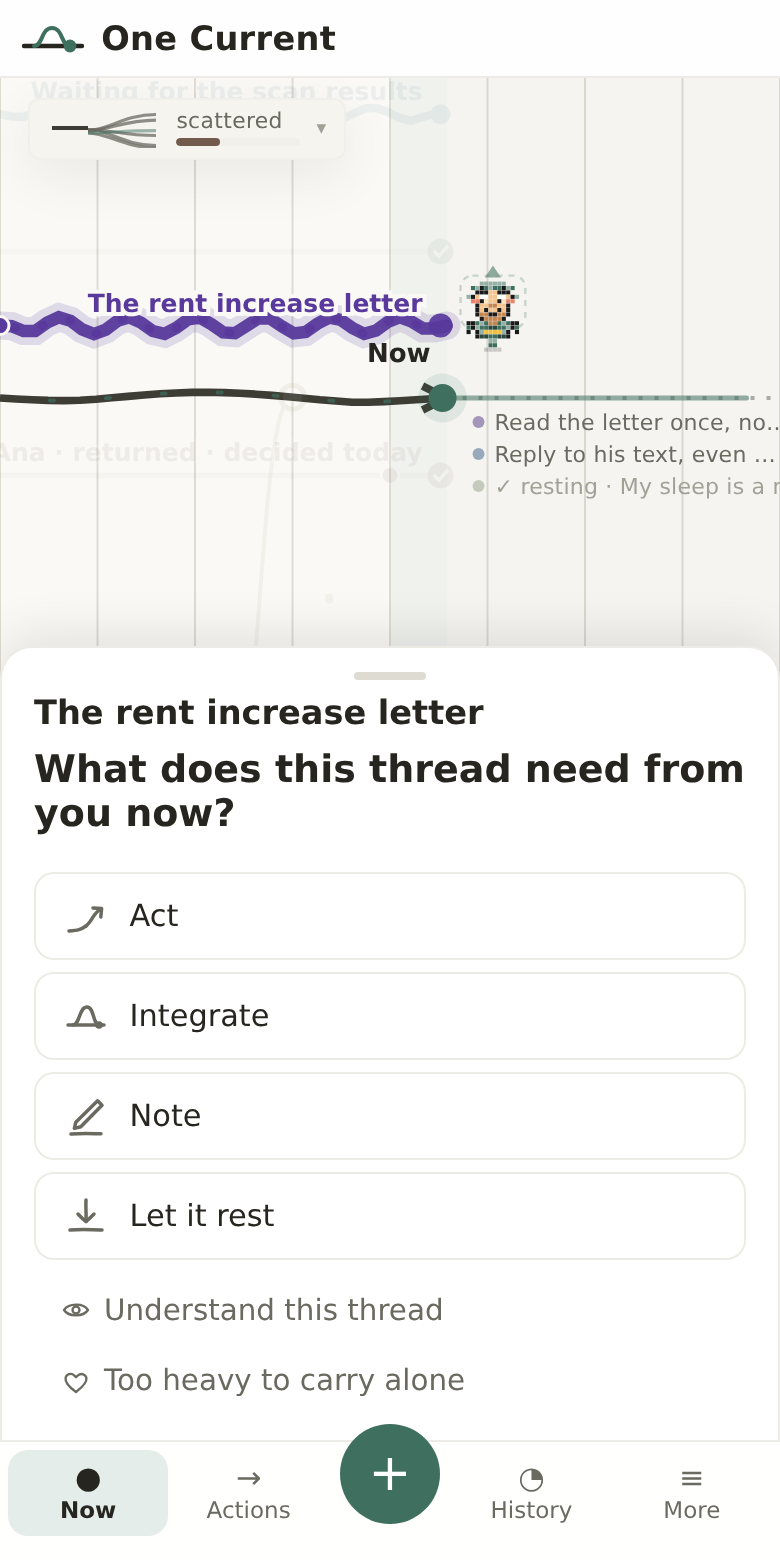
When you want to do more, open the full menu and answer one question: what does this thread need from you now?

Act — take one small step. Integrate — bring back what still matters. Note — add what just happened. Or say honestly: nothing can be done about it right now — and that counts as a decision too.

The full menu for a thread: four answers to what it needs — Act, Integrate, Note, or Let it rest — each on its own row with a small drawn icon, and two quieter options underneath: Understand this thread, and Too heavy to carry alone.

Four honest answers. No forms, no scoring.

4 The line changes

Your decisions show up on the timeline itself. Steps you chose appear ahead of Now. Threads you decided on today are marked. A thread you integrate curves back into the main line and stays part of your history.

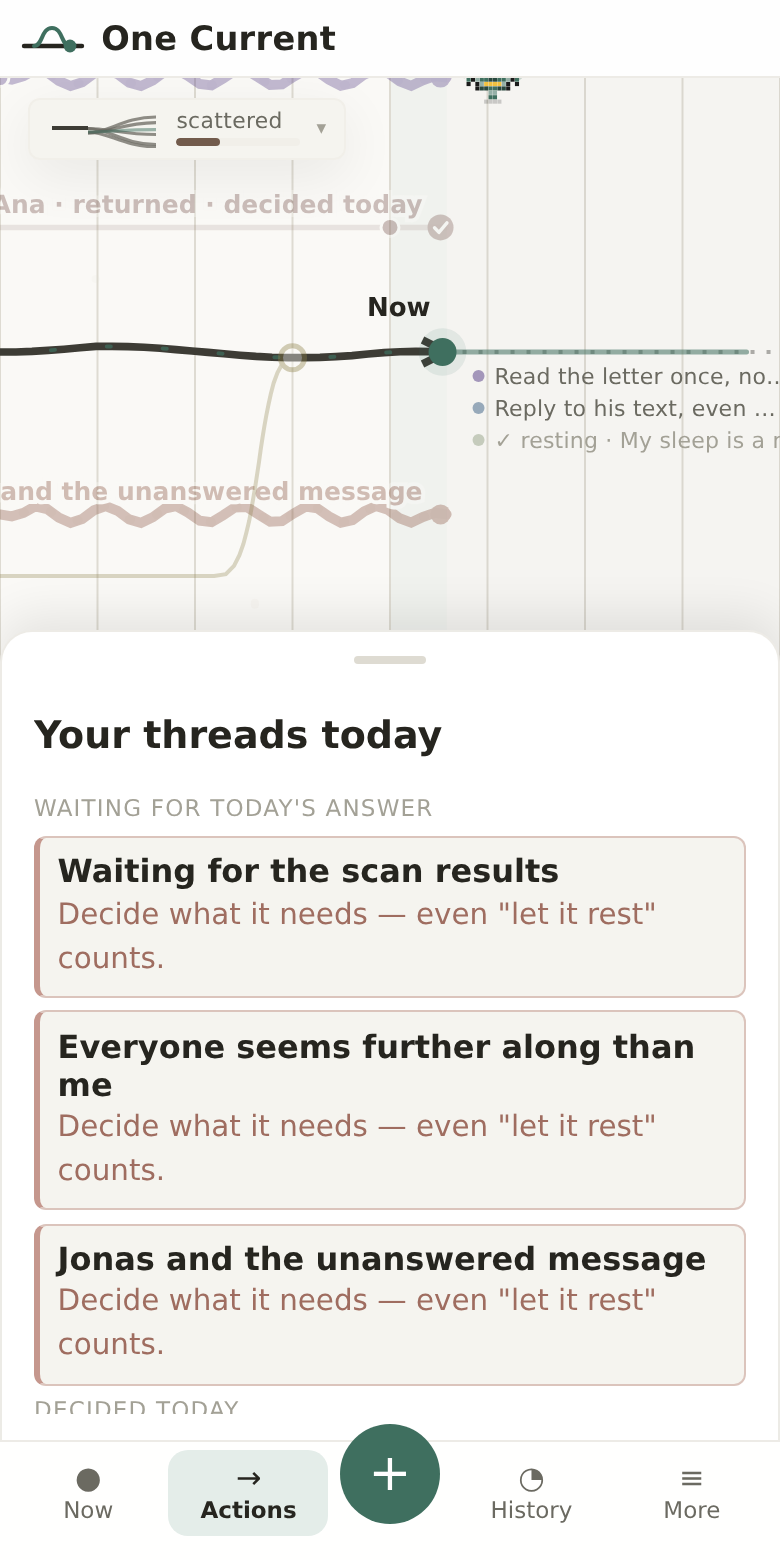
The Actions view gathers it into one glance: which threads still need a decision today, and which are already settled.

The Actions panel: threads still undecided today above, threads already decided below — each with a short human sentence.

Undecided above, decided below — nothing more to track.

5 Go deeper only when you want to

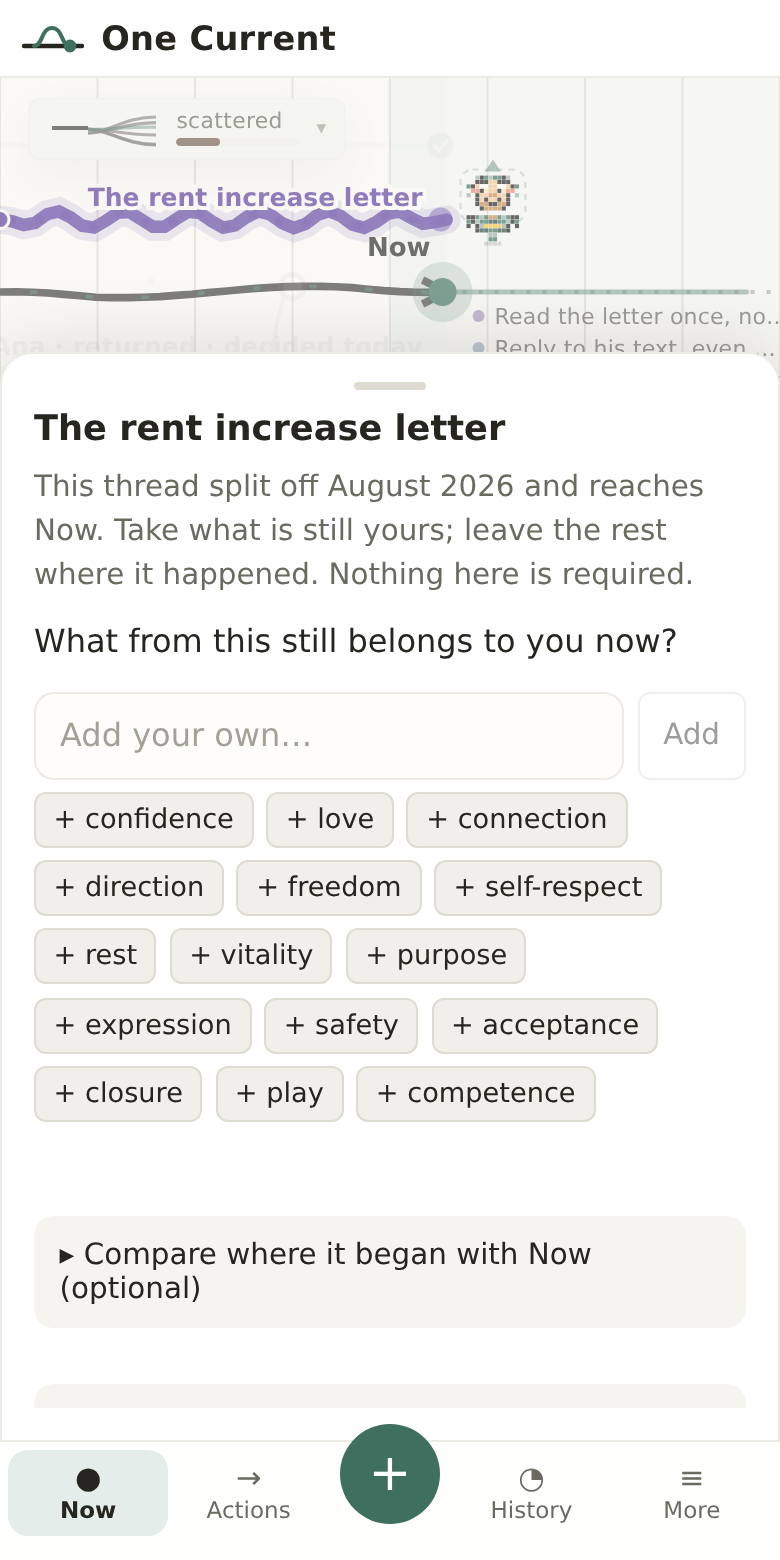
Every thread has a quieter door: understand this thread. There you can name what from it still belongs to you now — confidence, rest, connection, closure — compare where it began with where you are, and notice what feels less available while it stays open.

All of it is optional. Nothing here is required.

The understanding view for a thread: 'What from this still belongs to you now?' with gentle word chips like confidence, rest, closure, and optional deeper sections below.

Take what is still yours; leave the rest where it happened.

6 See how gathered you are

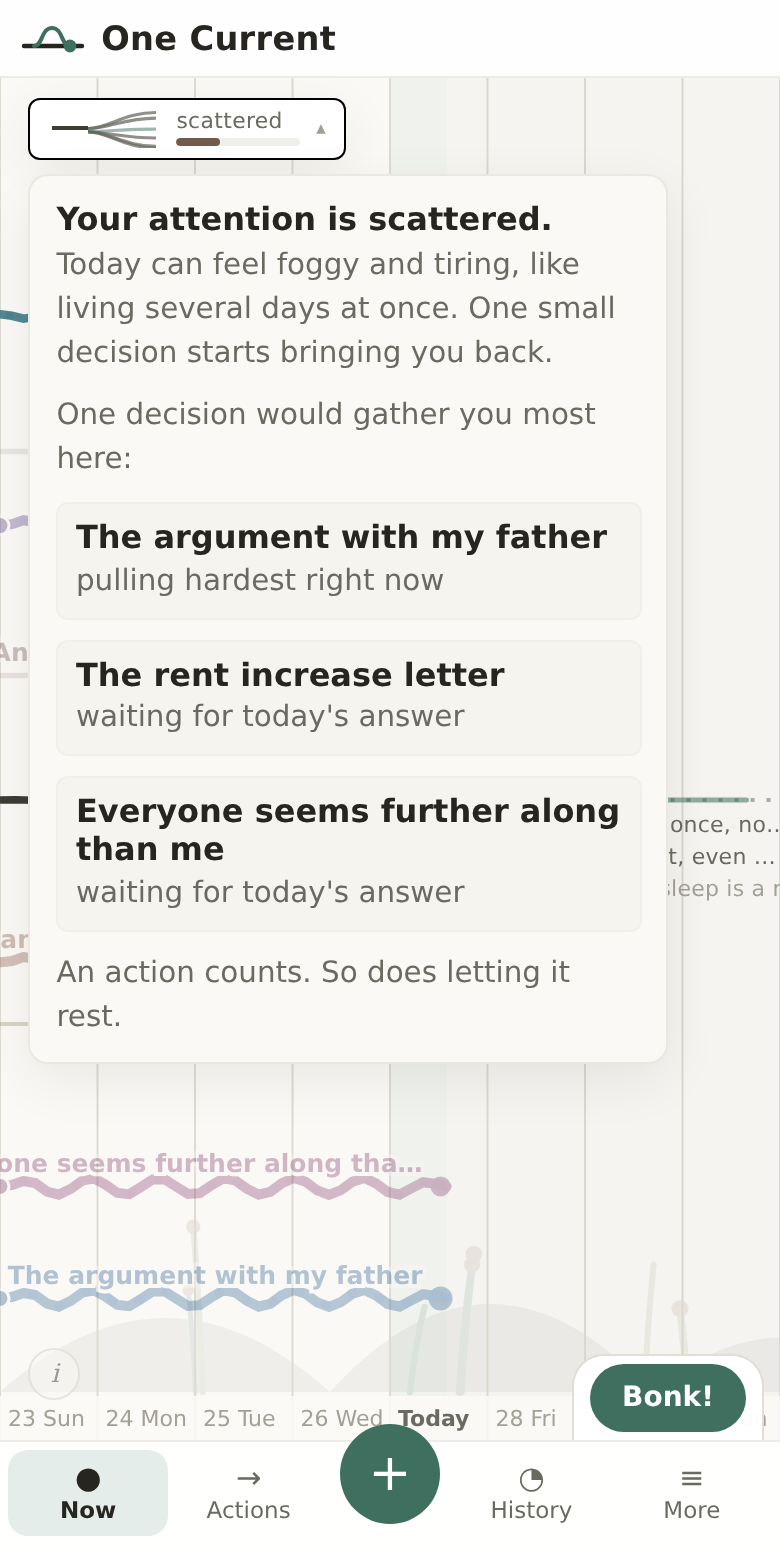
A small chip in the corner shows your wholeness — how many threads are pulling on you, and how loudly. When you are scattered, it tells you plainly, and points at the one decision that would gather you most right now.

The same loudness flows into your history: day by day you can see which feelings your open threads were holding, and how deciding on them gave the energy back.

The wholeness panel open: a plain-language summary of how scattered you are, followed by the threads pulling hardest right now.

Not a score to optimize — a weather report, and one next step.

Your companion

Pip keeps watch while you live your day

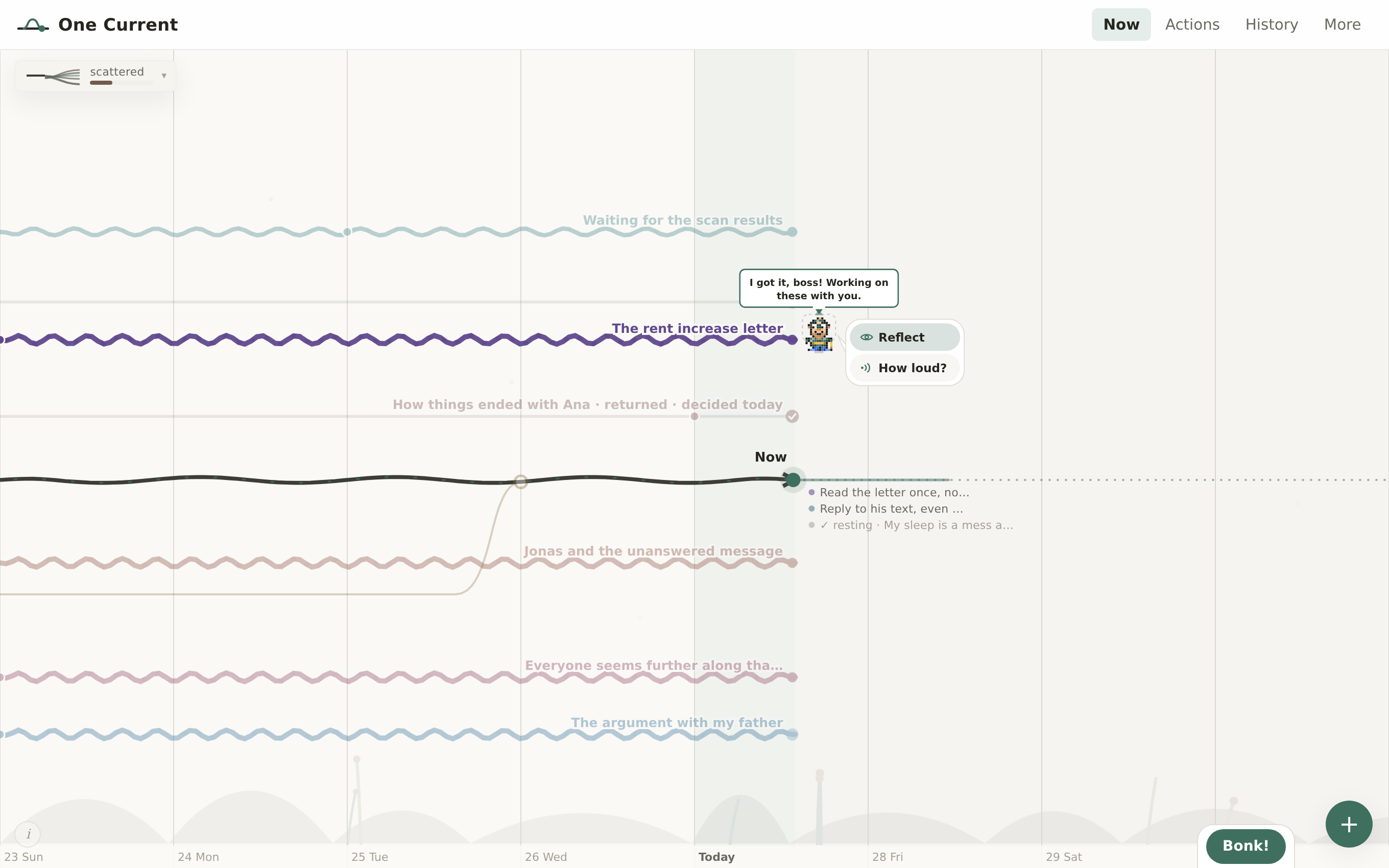
A small animated character lives on your timeline. He patrols your threads, spots what needs attention, and reacts every time you make a decision — like having a patient, encouraging friend keeping tabs on things with you.

He patrols your threads

Pip zigzags between your open timelines on his own — inspecting each one, staying longer on the loudest threads. He's always doing something. Nothing slips past him.

When he picks his next destination, that thread lights up first so you know exactly where he's heading before he moves.

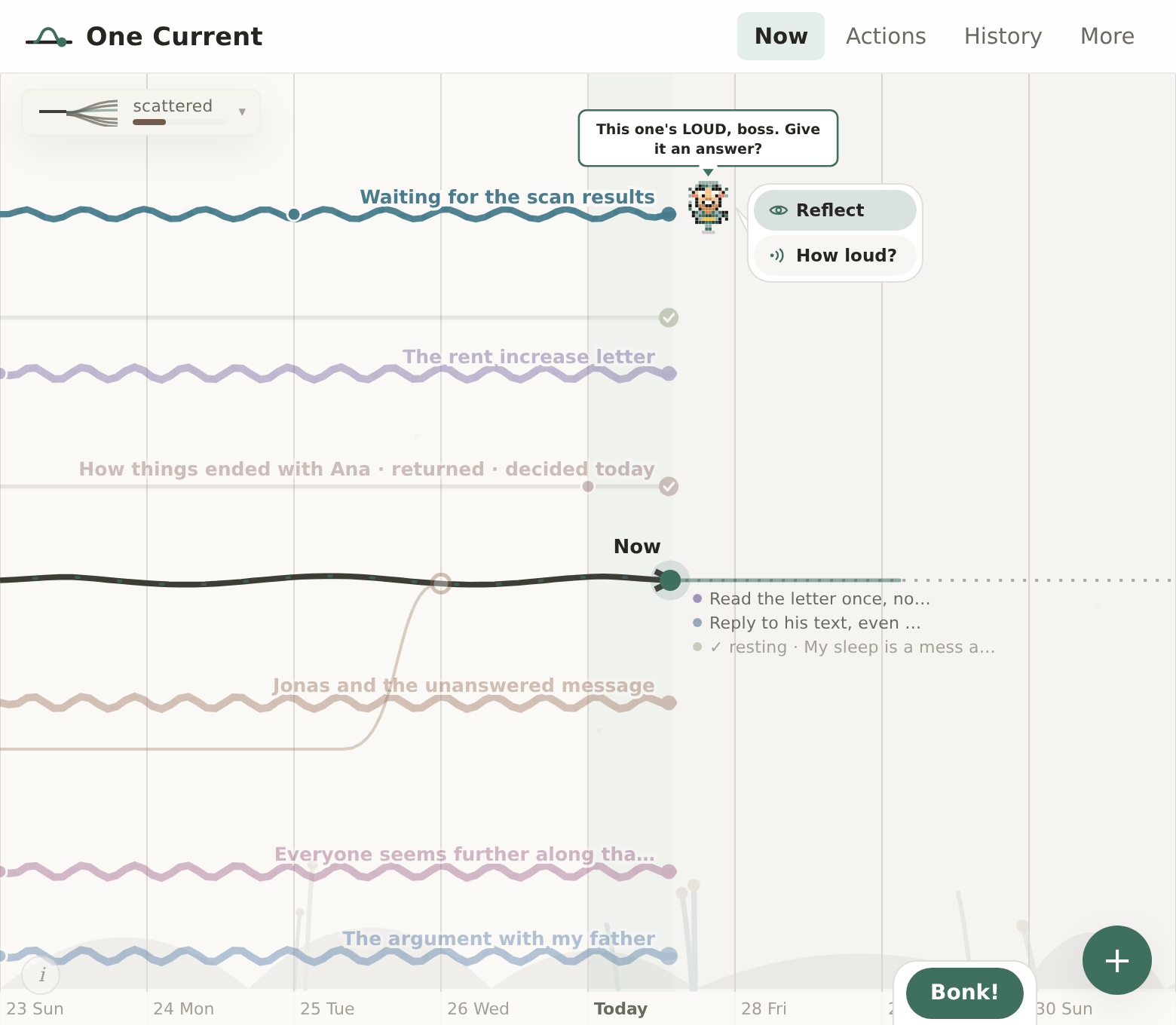
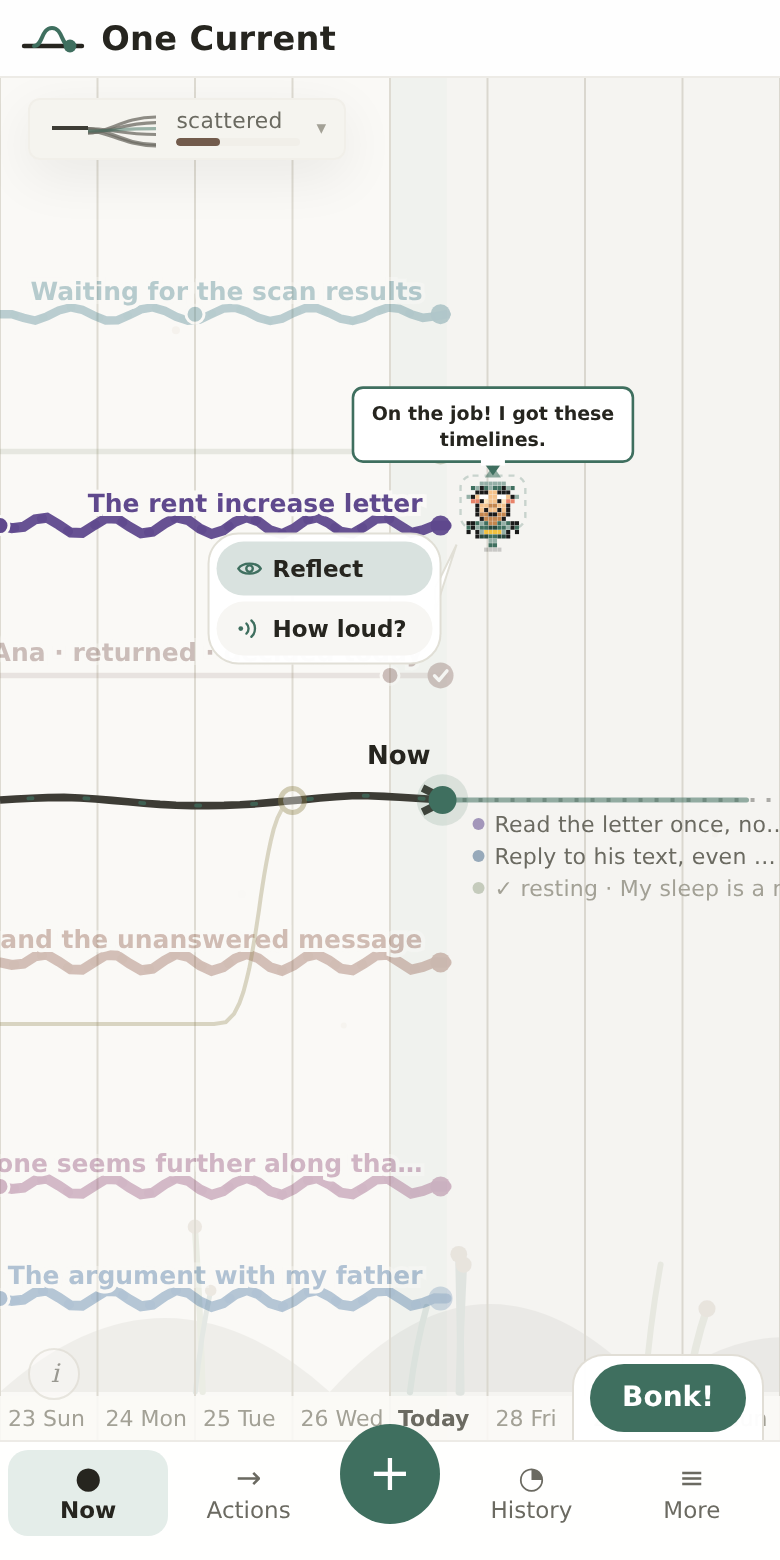
The One Current timeline with Pip, the animated pixel-art companion, standing at the end of a loud thread. A speech bubble above him reads “This one's LOUD, boss. Give it an answer?”, and two offers sit beside him: Reflect, and How loud?

Pip highlights the thread he's about to visit — then runs.

He nudges you, never nags

When Pip lands on a thread he opens a small speech bubble with a one-line read of the situation: "This one's LOUD — want to sort it?" or "Boss, I think this one's ready to close!"

Tap him and the thread's action panel opens. One move and you're done.

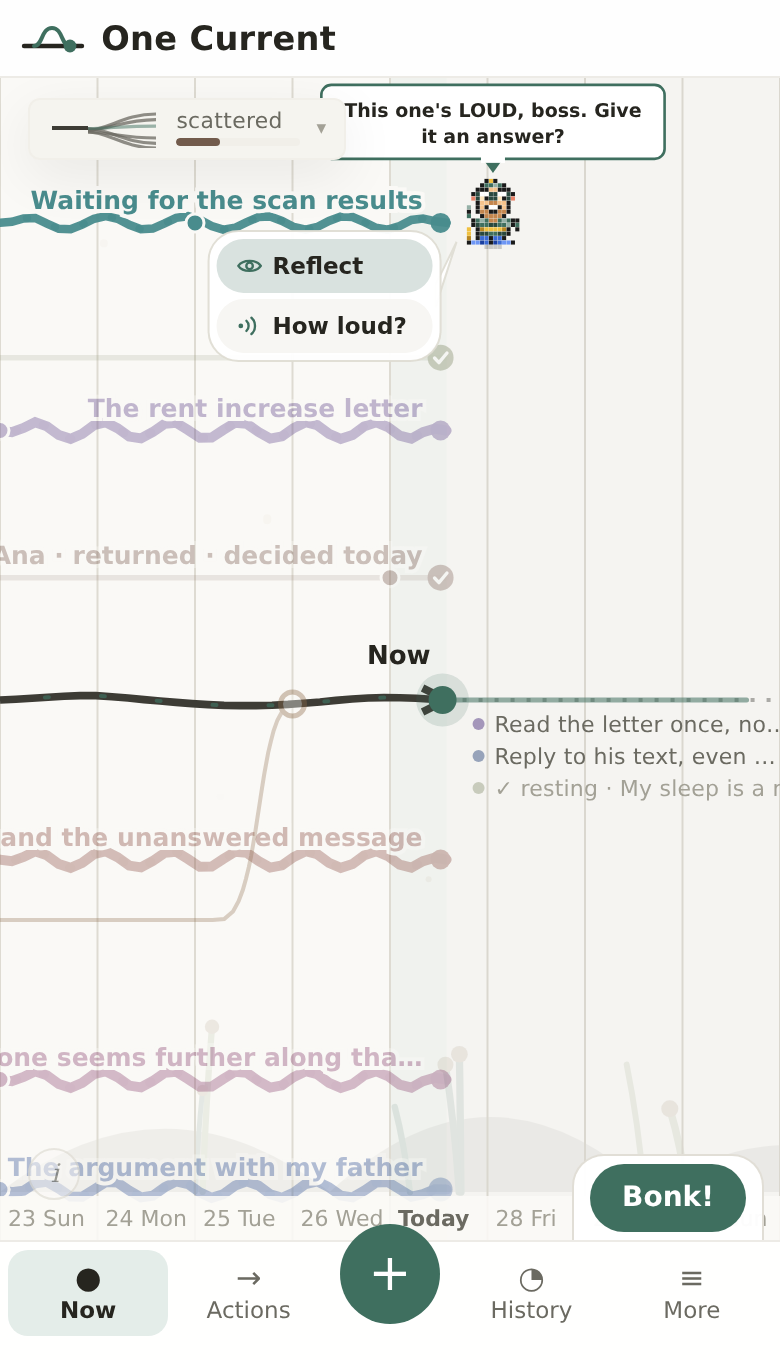
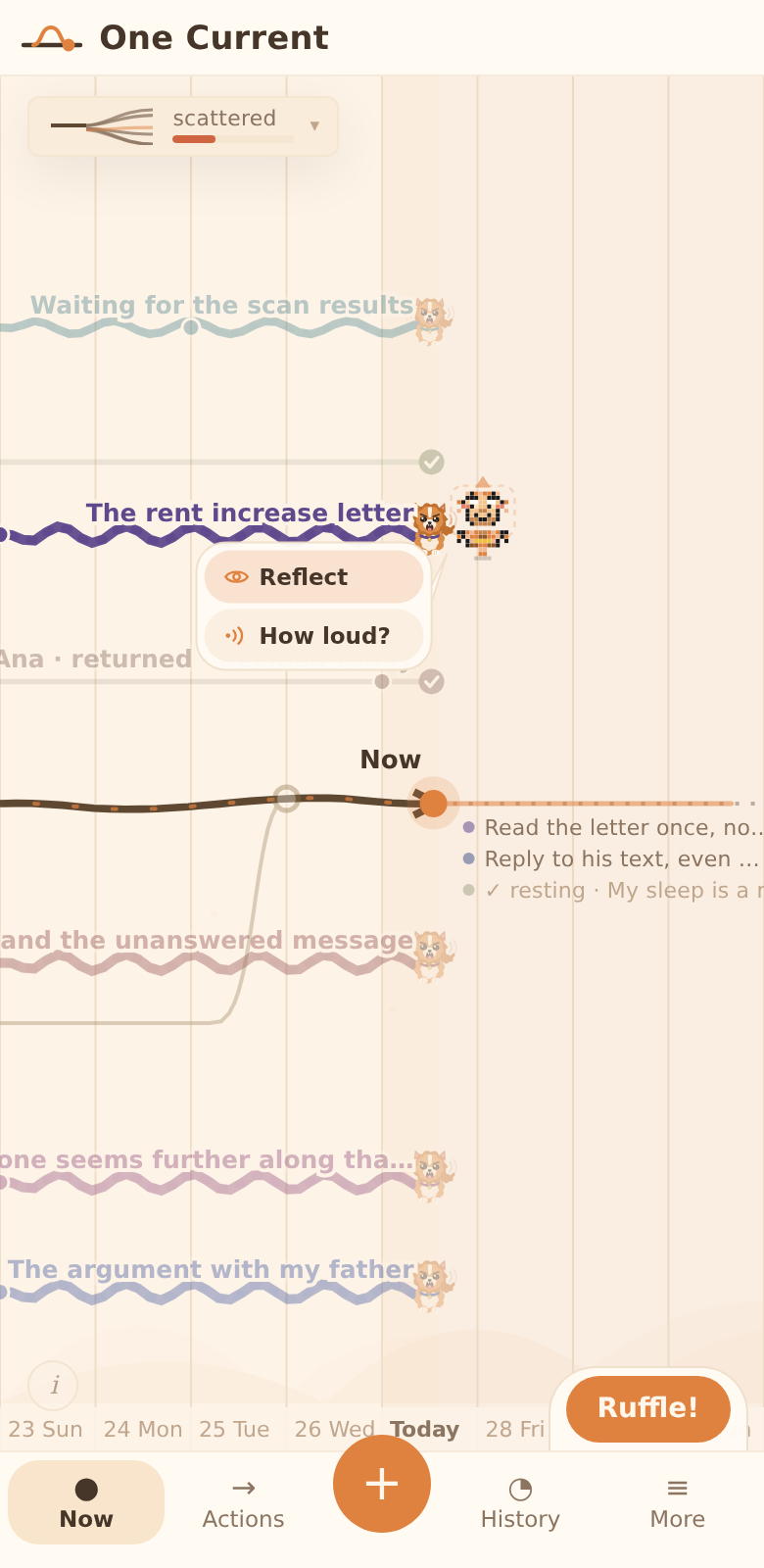
Pip on mobile, standing at a thread endpoint with a speech bubble above him saying “This one's LOUD, boss. Give it an answer?” and his two offers below it: Reflect, and How loud?

Short reads, never demands. Tap him to act on the thread.

He celebrates every move you make

Merge a thread — "HANDLED! One less thing, boss!" Add a note — "Got it. Witnessed." Take an action — "PLAN LOCKED. Let's go!"

Small wins deserve recognition. Pip gives it every single time, in the voice of a friend who is genuinely rooting for you.

"I got it handled, boss!"
On opening the app
"HUGE ONE. You really did that!"
After a big merge
"Deep one. Worth a sit-down."
Inspecting an identity thread
"Action taken. That's how we roll."
After deciding a step

Three companions, one for you

Choose from three characters in Settings → Companion. The Chronicler arrives with spectacles and a gold quill. The Wisp floats between threads trailing ethereal light. The Wanderer strides in with a wide hat and a staff.

All three wear your current theme's accent color, move with the same fluid zigzag patrol, and carry the same unmistakeable buddy energy.

Chronicler
Wisp
Wanderer

Three companions. Switch any time in Settings → Companion.

The sister app

Wellspring — the same river, flowing toward what you're for

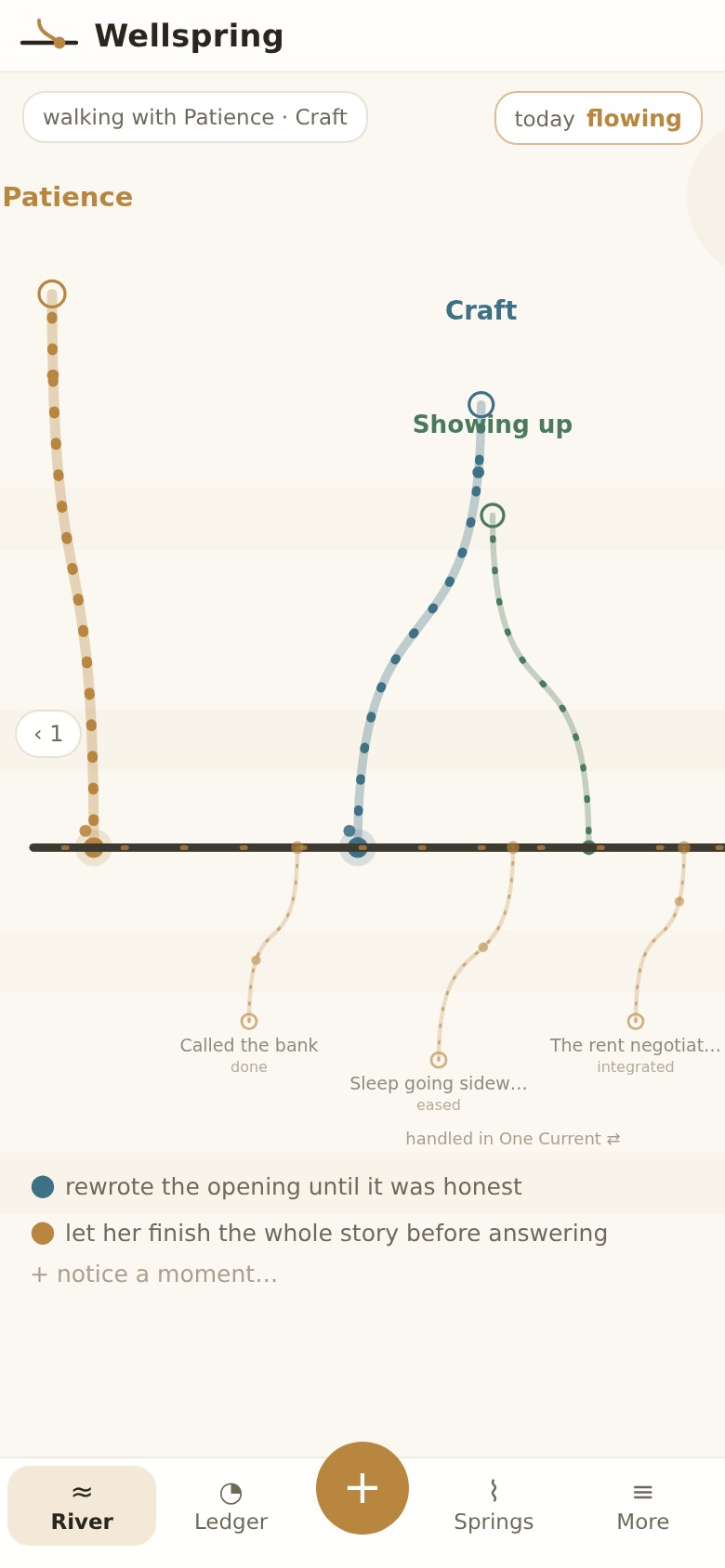
One Current holds what worries you. Wellspring holds what you value — patience, honesty, craft, showing up — as springs that feed the same line of Now. Same account, same calm, and the two apps talk to each other.

Handled there, watered here

Every worry you settle in One Current — a thread integrated, a decision eased, an action done — arrives in Wellspring under the line and rises up into it. Tap one and dedicate it: “handling the rent negotiation watered Patience.” It becomes a moment of evidence on that spring.

Nothing to export, nothing to copy. Sign in with the same account and the apps sync through your own encrypted backup — handled worries flow in on their own.

Wellspring's river: springs named Patience, Craft and Showing up flow down into the line of Now from above, while three small tributaries labelled 'Called the bank — done', 'Sleep going sideways — eased' and 'The rent negotiation — integrated' rise into the same line from below, marked 'handled in One Current'.

Worries handled in One Current rise into the line from below — and water your values.

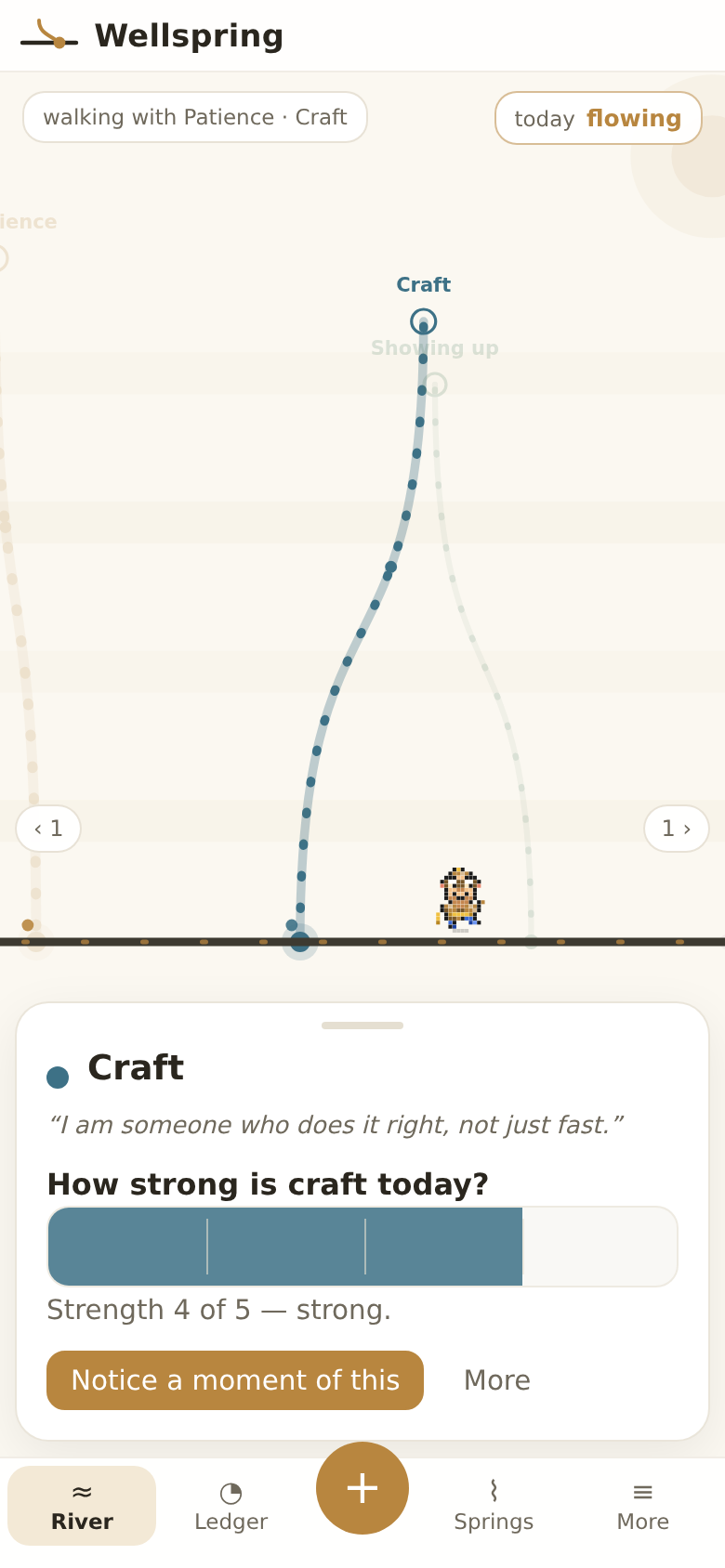
How strong is it today?

Tap a spring and the panel opens with one question and the same dial One Current uses for loudness — a bar you drag with your thumb, from a whisper to leading. The river answers while you move: the spring thickens live behind the panel.

Springs you feed run thick and bright. Leave one for a week and it only whispers — nothing scolds, nothing turns red. Values here are evidence, not streaks.

A spring panel open over the compressed river: 'Showing up', its identity sentence, a strength bar reading 'steady', and a Notice-a-moment button — while the river, its labels and the little companion stay visible above.

The panel never hides the water — the line rides just above it, Pip included.

Living looks, living world

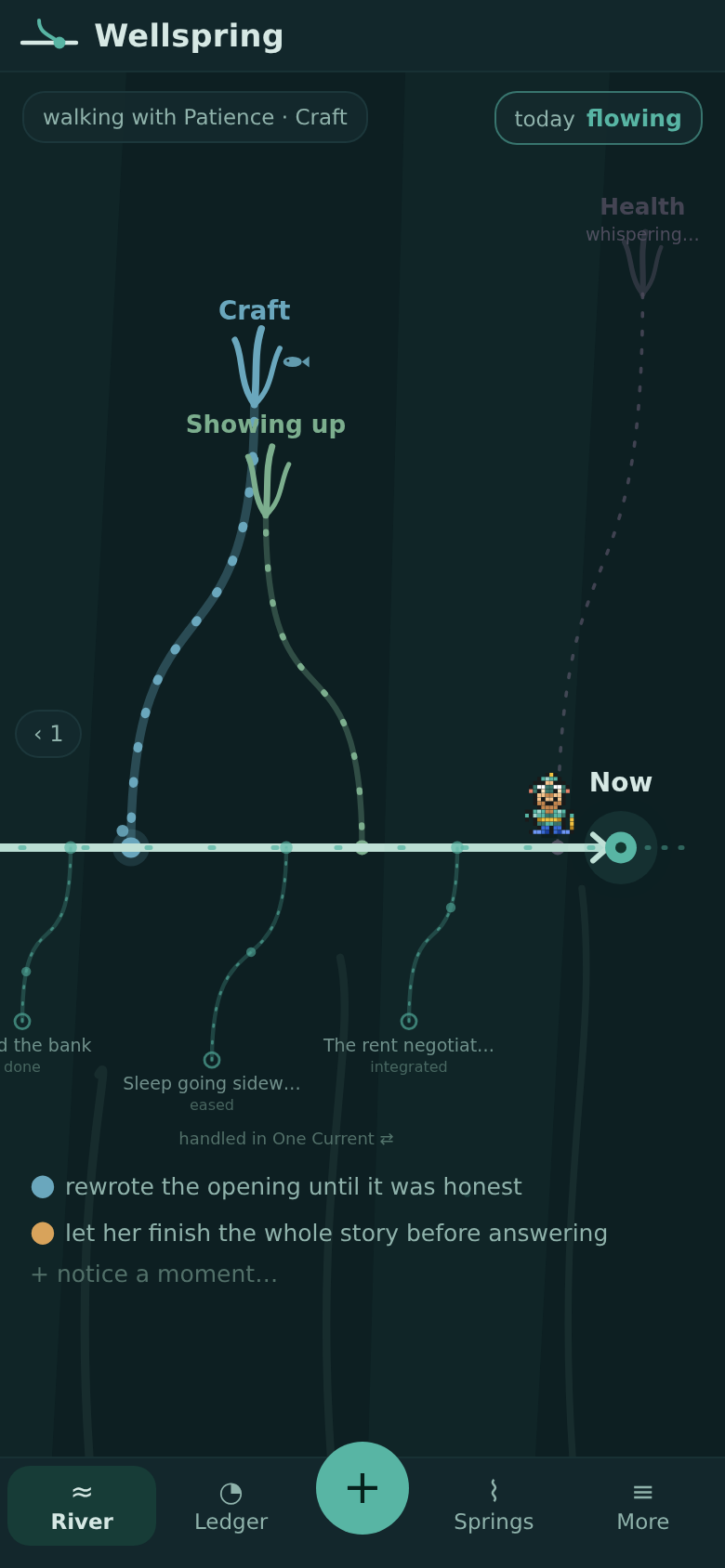
Six looks, each a world behind the water: in Seaweed every spring is a kelp strand with light shafts and rising bubbles — feed one and a small fish visits. Meadow grows flowers and a slow bee, Lanternfall hangs paper lanterns, Aurora flickers stars.

And your psychologist can see this river too: share springs, strengths and moments with the same one-time code One Current uses, rendered beautifully in the same free companion app.

The Seaweed look: a deep-water teal river where each spring is a kelp strand crowned with swaying fronds, a small fish beside the freshly fed one, light shafts and bubbles behind.

Seaweed — one of four living Pro looks, each with its own world.

Why it works

You were never built to hold it all at once

Nothing is wrong with you. A mind holding six open worries is a mind doing exactly what minds do — rehearsing anything unfinished, over and over, so it isn't lost. One Current gives all of it somewhere to sit. Here is what happens when it does.

The moment it's outside your head, it stops being everything

A worry you're carrying has no edges. Drawn as a line with a beginning and an end, it becomes one thing among a few — finite, and visibly smaller than you.

That's the whole first move. You don't have to solve it. You just have to set it down somewhere you can see it.

The mind rehearses open loops uninvited — but experiments find the intrusions quiet down once the loop is written down concretely, even though nothing has been done about it yet. See the studies

now

Give it a name and the volume comes down on its own

One Current only ever asks for a few words in your language — not a score, not a category. That plain naming is doing more than record-keeping.

You'll feel it as the difference between a hum you can't place and a sentence you could say out loud.

In brain-imaging work, putting a feeling into words quiets the amygdala — the brain's alarm — while lighting up the region doing the naming. Naming isn't nothing; it's regulation. See the studies

“I think she's already gone”

Resting counts. There is no streak to break

Deciding that nothing can be done today is a real answer, and the app records it as one. The thread goes quiet, and you did that on purpose.

No counters, no rising numbers, nothing that punishes you for a hard week. The only thing that ever grows is the part of you that isn't somewhere else.

We built the playful layer from what trials support — game elements help people keep going, not feel better by themselves — and left out what the same literature warns against. See the studies

rested — on purpose 12-day streak

Nothing gets crossed out. It comes back into you

When a thread is finished for now, it curves back and rejoins your line — and you choose what it hands over. The patience you found. The self-respect. It goes into the line, not into a bin.

And if it returns one day, that isn't failure either. You meet the newer, smaller version of it, standing on everything the last one gave you.

A study of how apps draw broken progress found the drawing itself changes behaviour: breaks shown as repairable keep people going, breaks shown as final make them quit. Nothing here is ever drawn as final. See the studies

self-respect

The idea underneath

Your own language worked this out a long time ago

Listen to how everyone already talks about their inner life:

get a grip hold that thought put it down let it go carry a worry handle it drop it pick it back up

Every one of those is a hand word. Of all the metaphors available, the one our whole species reached for is: thoughts are objects, and hands handle them.

So we stopped treating that as a figure of speech and built it. A thread you can see, touch, turn down, set aside and pick up again. We call the working idea the Graspability Hypothesis — a feeling becomes easier to steady roughly in proportion to how graspable you can make its shape.

the worry, made graspable the feeling follows the hand

Said plainly: One Current is built on this research, not proven by it. It has not been through a clinical trial, and we will never pretend the app treats anything. The full page shows every study, including the ones that complicate our case.

Read the research in full

And a few convictions we won't trade

It asks for the smallest honest step

Never a plan. Send one message, read the letter once, say one true sentence. Small enough that you'll actually do it today.

A minute, not an evening

Every screen has one purpose and a handful of words. You decide, the line changes, and you get your evening back.

Some things are too heavy alone

When a thread is one of those, One Current says so plainly — and makes reaching for another person one of the ordinary answers, not the last one.

Pro Paid upgrade

More threads, all themes, and a direct line to your psychologist

The free app lets you keep up to ten open threads and use five quiet themes. Pro removes those limits and adds cloud backup, all seven living creature themes, and the ability to share your timeline with your psychologist using a single eight-character code — no files, no complicated steps. And it carries across the family: the same Pro unlocks Wellspring's living looks and its psychologist sharing too.

Your One Current private, on your device
8-character code — you choose which threads
(no return path needed — the session is the conversation)
The companion app free for clinicians, no install

1 You choose what they see

Before a session, pick which threads to include — one by one. Then tap Upload and get a code. An eight-character code appears: valid once, for fourteen days, and nothing is sent until you hand it over.

2 The timeline on the table

Your psychologist enters the code in the companion app and your timeline appears — read-only, no account needed on their end for the local version, or free account for cloud redeem. Walking a thread together gives the session a shape beyond a blank "how was your week?"

3 Day by day

The companion app shows every day in the shared period: which threads moved, which got louder, which were decided on. The conversation starts with the picture already in front of both of you.

The companion app — real, running now

Not a concept. A working web app your psychologist can open at practice.onecurrentapp.com right now, for free.

Shared timeline

The same branching timeline your patient knows, sized for the session. Tap any marker to see what happened on that day and the thread's full arc.

Day by day

Every recorded day stacked under each other — loudness moves, decisions taken, quiet runs folded into a single line. Nothing to interpret; just the record.

Multiple clients

Each client's shared files are kept under their name. New shares from the same patient stack in order. Everything stays on the practitioner's device.

Share codes are one-time and expire in fourteen days. Your timeline data moves only when you perform the act of sharing — the code is useless after a single redeem. Cloud backup is opt-in and stored on your account; your psychologist keeps only what you chose to share. One Current is not a diagnostic tool, a medical record, or a crisis channel.

One Current Pro

€6 / month

Billed monthly. Cancel anytime.

Upgrade to Pro

One plan covers both apps — One Current and Wellspring. Your psychologist never pays — the companion app is always free for clinicians.

  • Unlimited open threads — no ten-thread cap
  • All seven creature themes — Pompom, Demonfire, Koi pond, Carnival, Catnap, Abyss, Gravemist
  • Share with your psychologist — one code, one use, your choice of which threads
  • Cloud backup — restore your full history on a new device
  • Wellspring's living looks — Seaweed, Meadow, Lanternfall, Aurora
  • Wellspring sharing — your values river to the same psychologist, same one-time code
  • The companion app for your psychologist — timeline, day-by-day, multiple clients
  • Every future Pro feature — one plan, nothing tiered

For psychologists & therapists

A dedicated app for the session — free, forever

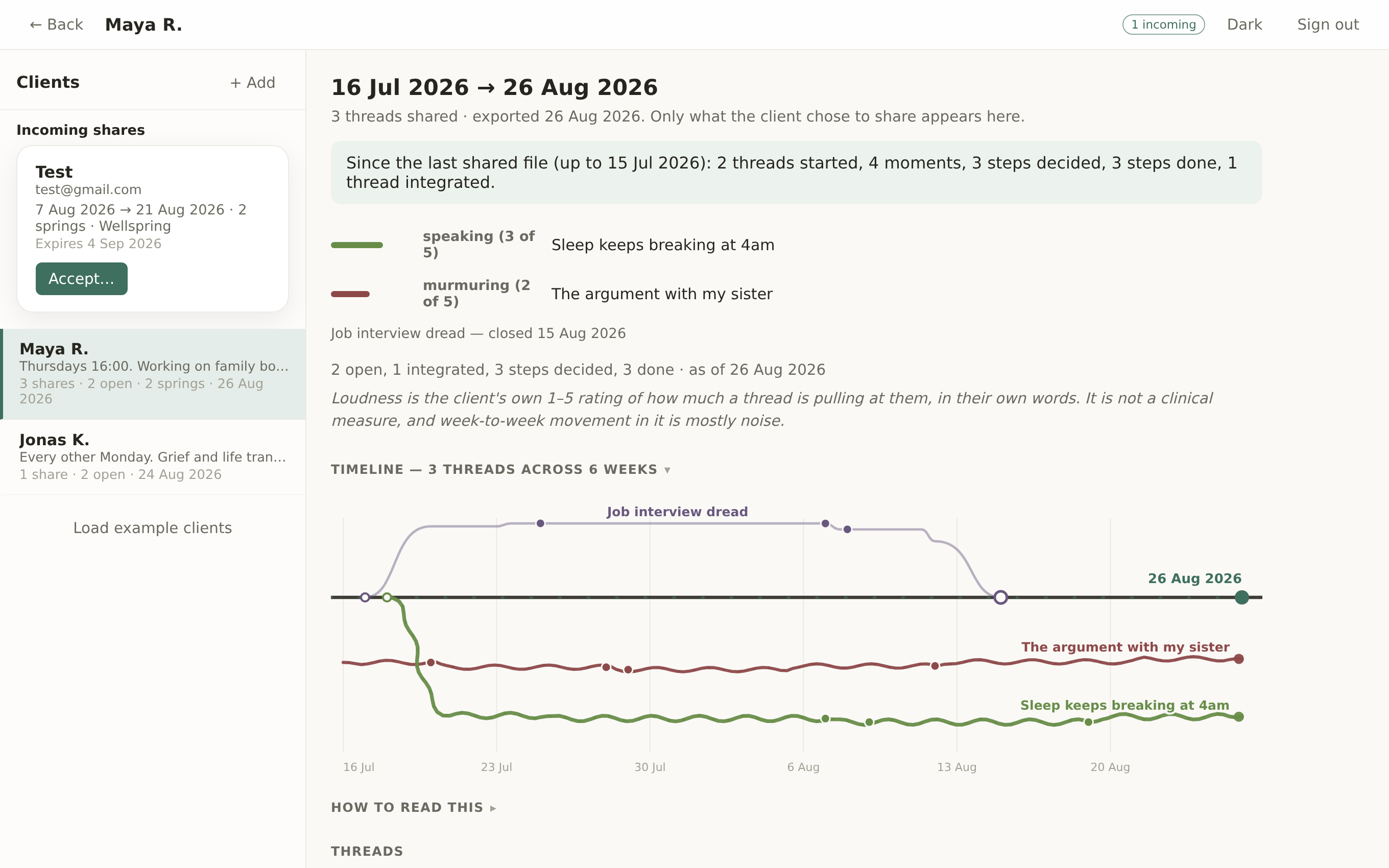
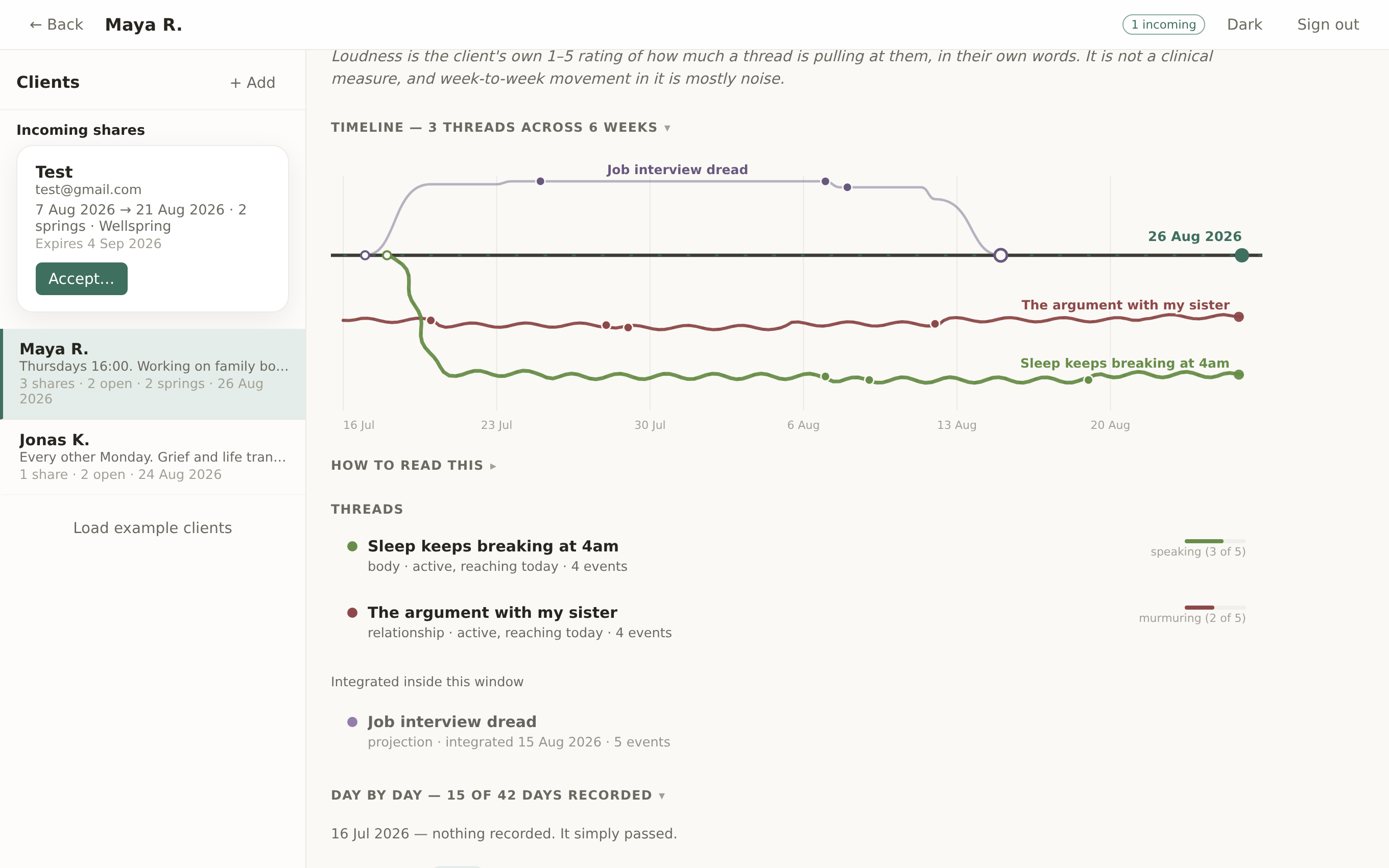
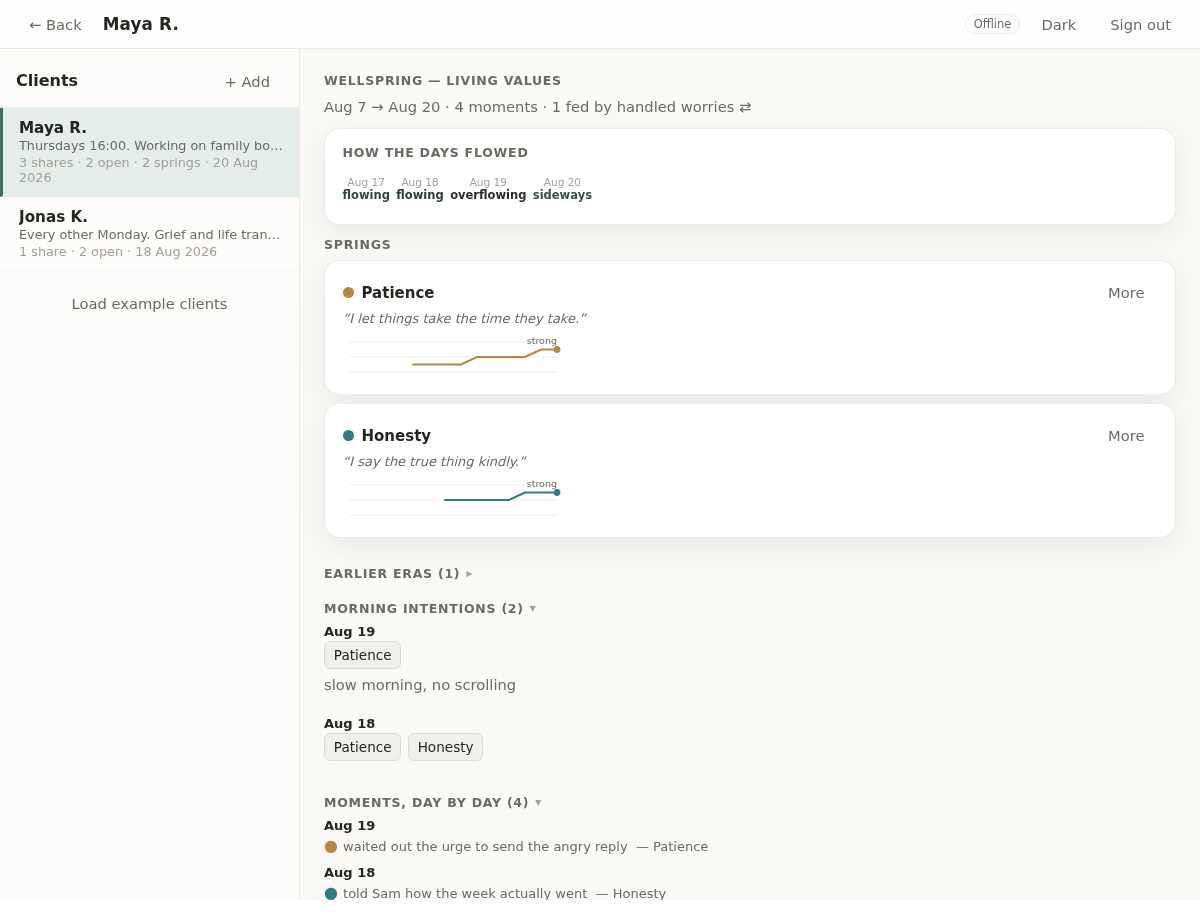
You never pay. Your patient shares their timeline with an eight-character code; you enter it, and their threads appear in your app. Two views keep the conversation grounded: the shared timeline with tappable markers, and a day-by-day record of every moment they logged. Wellspring shares arrive the same way — their values, daily strength readings and moments of evidence, rendered alongside the threads, with a ⇄ mark wherever a handled worry fed a value.

The companion app: a client list on the left and the shared timeline with thread markers on the right.
Shared timeline — tap any marker to see the thread arc
The day-by-day view: each day stacked under each other with loudness moves, decisions, and quiet days folded into a single line.
Day by day — every logged moment, quiet days folded
The companion app showing a client's Wellspring share: a flow-word day strip, spring cards for Patience and Honesty with identity sentences and 14-day strength sparklines, morning intentions, and moments day by day.
Wellspring shares render alongside — values, strengths, and what watered them

No install, no account needed for file import

Open the web app in any browser. Your patient sends their threads as a file or a code — you import it, and the session begins. Nothing lives on a server you don't control.

Code-based sharing (with a free account)

Create a free account, add your patient as a client, enter their eight-character code. The share arrives instantly — valid once, expired after fourteen days.

Multiple clients, kept separate

Each client's timeline is stored under their name on your device. New shares from the same patient stack in order. You can delete any client's data at any time.

Open the companion app Free for clinicians — no subscription, no install, no account required for file import.

Themes

Choose how your threads look at you

Five quiet looks — Riverbed, Midnight, Sunprint, Duskwood, Porcelain — are free. Seven living ones, where every open thread ends in a small creature facing you at Now, come with Pro. Each creature grows more restless the louder its thread gets, and the moment you give it an honest decision, it settles.

Pompom Pro

Peach fluff and button eyes. Every open thread is a pomeranian pup — leave it waiting and it barks.

The Pompom theme: a warm peach timeline where each open thread ends in a small orange pomeranian.

Demonfire Pro

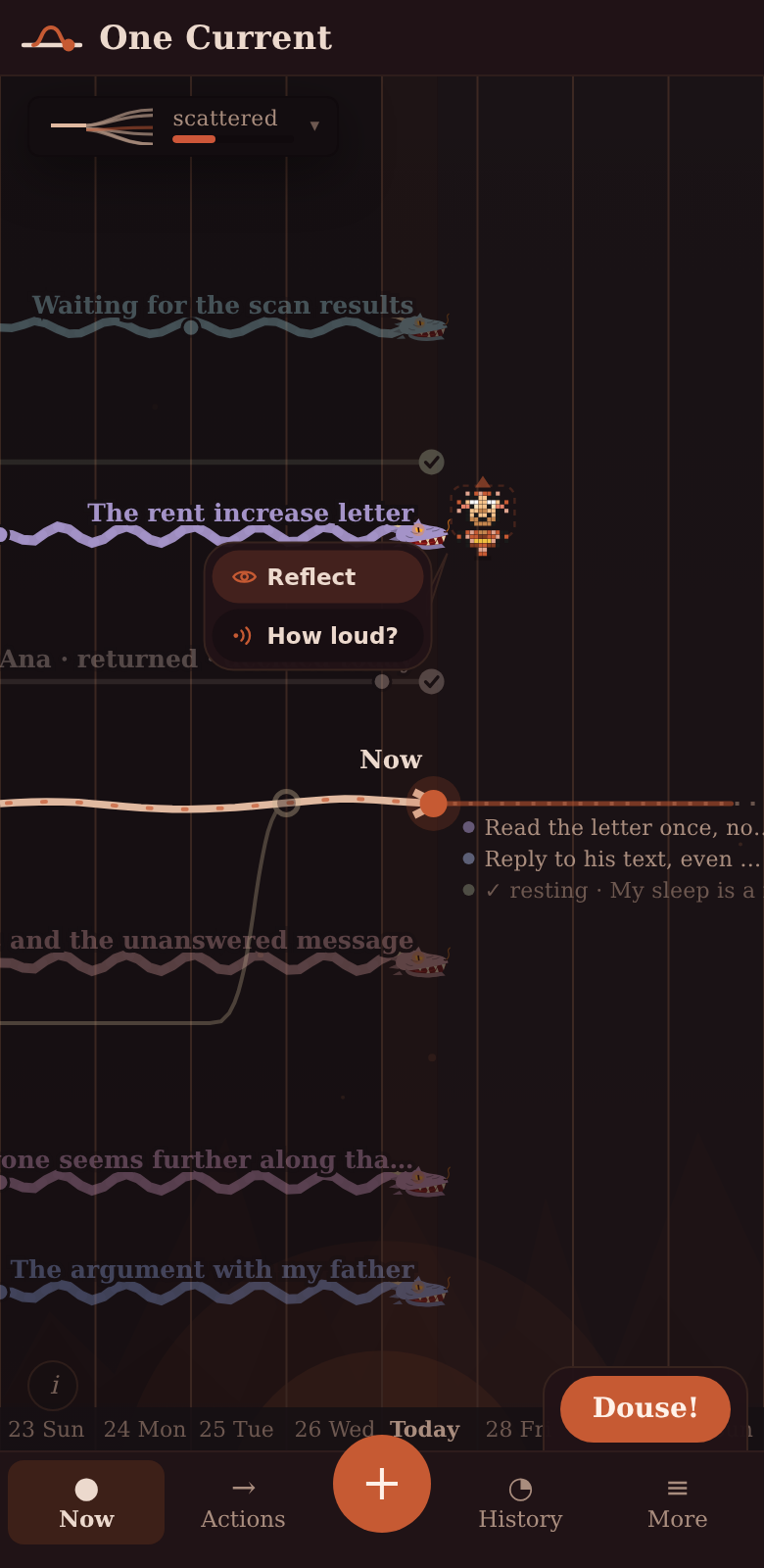
Ember dark. Every open thread is a small dragon — face it kindly and it settles.

The Demonfire theme: a dark ember timeline where each open thread ends in a small dragon head.

Koi pond Pro

Still water. Every open thread is a koi nosing at Now — feed it a decision and the pond settles.

The Koi pond theme: a pale water-green timeline where each open thread ends in a koi fish nosing at the Now marker.

Carnival Pro

Cream and bunting. Every open thread is a balloon — the longer it waits, the tighter it swells.

The Carnival theme: a cream timeline with bunting colours where each open thread ends in a balloon.

Catnap Pro

Lavender and soft paws. Every open thread is a cat watching you — answer it and it curls up.

The Catnap theme: a soft lavender timeline where each open thread ends in a small cat's face watching you.

Abyss Pro

Deep-sea black. Every open thread is an anglerfish — the louder it grows, the brighter its lure.

The Abyss theme: a deep-sea black timeline where each open thread ends in an anglerfish with a glowing lure.

Gravemist Pro

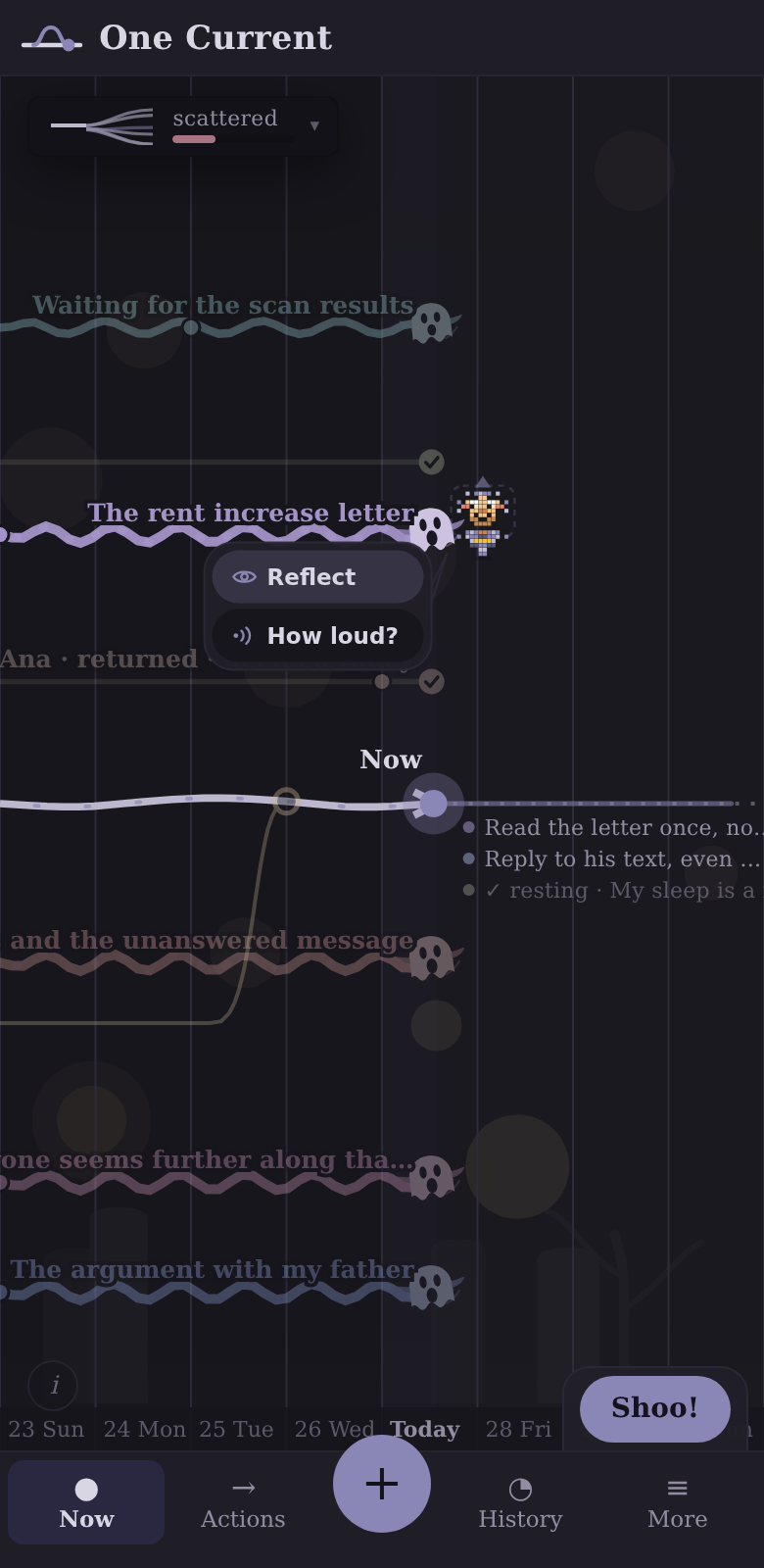
Fog and lantern light. Every open thread is a small ghost — its wail widens until you answer.

The Gravemist theme: a foggy lantern-lit timeline where each open thread ends in a small ghost.

Privacy

Your threads stay on your device

What you write in One Current is stored locally on your device — not on our servers. Creating an account lets you back up your history to the cloud and share with your psychologist using codes, but those features are opt-in. Your backup is encrypted before it leaves your device. We have no ads, no analytics, and we never sell your data.

Share codes are one-time and expire in fourteen days. Your psychologist sees only the threads you chose to include. You can export your full data as a file, and delete your account and everything in it at any time from Settings.